
Preparation
A basic character requires an identifier, a display name, a sprite-sheet path, frame dimensions, and the required animation definitions. Portraits, poses, sounds, combat artwork, and VN sprites are optional. Their absence does not prevent the character from moving or communicating.
Resource paths are relative to the folder containing char.json. For example, "sheet": "overworld.png" refers to a file beside char.json, while "portraits/neutral.png" refers to a file in the portraits subdirectory.
Caution: Keep all required character resources within the character folder. A path such as ../shared_art/sheet.png may function on the development computer but will fail if the shared file is not distributed. File-name capitalization must also match exactly when the content is used on a Linux system.

Minimum Character Configuration
The following example contains the fields required for a basic character and includes one portrait for message display.
{
  "schema": 1,
  "id": "my_character",
  "name": "Display Name",
  "overworld": {
    "sheet": "overworld.png",
    "frame_width": 32,
    "frame_height": 48,
    "animations": {
      "idle_down": { "row": 0, "frames": [0, 1], "fps": 3 },
      "walk_down": { "row": 0, "frames": [2, 3, 4, 5], "fps": 8 }
    }
  },
  "portraits": { "default": "portraits/neutral.png" },
  "default_expression": "default",
  "texture_filter": "nearest",
  "chat_color": "#3d6134"
}idis the stable internal identifier. Use letters, digits, and underscores.nameis the display name presented to users.texture_filtercontrols image filtering. Usenearestfor pixel art andlinearfor smooth, high-resolution artwork.chat_colorsets the background color of the in-character message panel. Use a sufficiently dark color to maintain contrast with white message text.portraits.defaultidentifies the fallback expression. Additional expression identifiers may be assigned as required.
Sprite-Sheet Definition
A sprite sheet is an image divided into equal animation cells. The frame_width and frame_height values define the dimensions of each cell. Row and column numbering begins at zero.
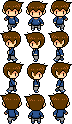
The definition { "row": 0, "frames": [2, 3, 4, 5] } selects row 0 and plays columns 2, 3, 4, and 5 in the listed order.
| Row / Column | Column0 | Column1 | Column2 | Column3 | Column4 | Column5 |
|---|---|---|---|---|---|---|
| Row 0 | 0 | 1 | 2 | 3 | 4 | 5 |
| Row 1 | 0 | 1 | 2 | 3 | 4 | 5 |
| Row 2 | 0 | 1 | 2 | 3 | 4 | 5 |
| Row 3 | 0 | 1 | 2 | 3 | 4 | 5 |
The highlighted cells correspond to "row": 0 and "frames": [2, 3, 4, 5]. Row and column numbers begin at 0.
- Blarp recognizes
idle_down,idle_left,idle_right,idle_up, and the four correspondingwalk_*names. - If a directional walk animation is unavailable, Blarp first uses the idle animation for that direction and then uses
idle_down. - If the left-facing artwork is a horizontal reflection of the right-facing artwork, reference the same row and set
"flip_h": true.
Movement Speed and Partial Animation Loops
The overworld.speed value sets the base free-roam speed in pixels per second. Its default value is 160. The overworld.run_multiplier value multiplies that speed while Ctrl-run is active. Its default value is 1.5.
"overworld": {
  "speed": 150,
  "run_multiplier": 1.6,
  ...
}
The loop_from field permits an animation to play an introductory sequence once and then repeat only the remaining frames. Its value is a zero-based position within the frames list.
"idle_down": {
  "row": 4,
  "frames": [0, 1, 2, 3, 4, 5],
  "fps": 8,
  "loop_from": 2
}
In this example, all six positions play once. Positions 2 through 5 then repeat. This arrangement can be used for an action such as drawing a weapon before entering an idle stance or lifting off before entering a hover. The loop_from value refers to a position in the list, not to a sprite-sheet column number.
Alternate Walk Sets
The walk_sets object defines alternate movement modes, such as sneaking, skating, or running. Each named set may use a separate sprite sheet and separate frame dimensions.
"walk_sets": {
  "sneak": {
    "sheet": "sneak.png",
    "frame_width": 80,
    "frame_height": 80,
    "speed_multiplier": 0.55,
    "animation_speed_multiplier": 0.75,
    "animations": {
      "idle_down": { "row": 0, "frames": [0], "fps": 3 },
      "walk_down": { "row": 0, "frames": [0, 1, 2, 1], "fps": 6 }
    }
  }
}speed_multipliermodifies ground speed while the set is selected.- Animation speed changes with ground speed unless
animation_speed_multiplierspecifies a separate value. - A set named
runsupplies the artwork used while Ctrl is held. Therun_multipliervalue continues to provide the speed increase. - The Walk selector is available when at least one alternate set is defined. The selected set is synchronized with other users.
Pose Definitions
A pose is a user-activated animation, such as a wave, seated position, or cheer. Define poses within the overworld object.
"poses": {
  "wave": {
    "row": 0, "frames": [2, 3, 4, 5], "fps": 6,
    "loop": false, "sound": "sfx/wave.wav"
  },
  "ready": {
    "row": 2, "frames": [0, 1], "fps": 4,
    "loop": true
  }
}
loop: falseplays the pose once and then returns the character to its idle animation.loop: truerepeats the pose until movement or selection of another pose cancels it.- A pose may override
sheet, the frame dimensions, andoffset: [x, y]. A negative Y offset moves tall artwork upward so that the character's feet remain aligned with the ground position.
Footsteps and Text Blips
Footsteps
"footsteps": {
  "frames": [0, 2],
  "sounds": [
    { "sound": "sfx/step1.wav", "weight": 1 },
    { "sound": "sfx/step2.wav", "weight": 1 }
  ]
}
Footstep frame numbers are local positions within the active walk_* list. If the list is [2,3,4,5], local positions 0 and 2 correspond to sprite-sheet columns 2 and 4.
Text blips
A text blip is a short sound played while an in-character message is being revealed. The configuration accepts one sound path, an array of paths, or weighted sound choices.
"blips": [
  { "sound": "blips/low.wav", "weight": 3 },
  { "sound": "blips/high.wav", "weight": 1 }
],
"blip_pitch": [0.9, 1.1]
Use a short audio sample because the sound may be triggered in rapid succession. Blarp plays blips for visible characters and does not play them for spaces.
Typing Indicator Adjustment
While a user is typing, Blarp displays the upper half of the idle_down frame at the lower-left of the viewport. Use typing_indicator to correct the scale or position when the default extraction does not align with the artwork.
"typing_indicator": {
  "scale": 1.25,
  "offset": [8, -12]
}
VN Sprite Definitions
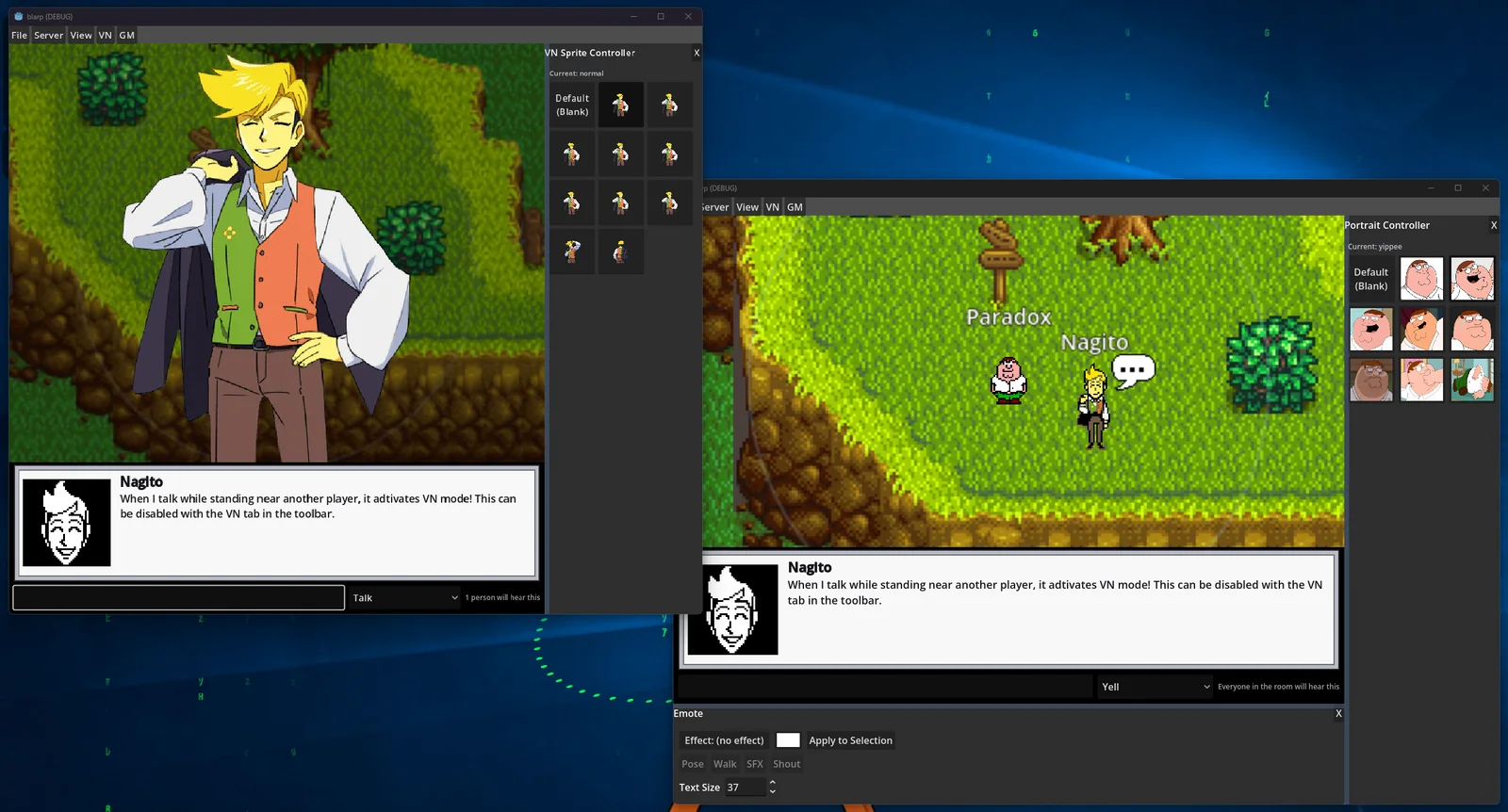
VN sprites are large character images used by the visual-novel display. By default, they share expression identifiers with portraits. The expression selected for a message therefore selects the corresponding VN sprite.
"vn_sprites": {
  "default": "vn/default.png",
  "angry": "vn/angry.png",
  "happy": "vn/happy.png"
}
If the portrait and VN sprite identifiers do not match, define the relationship explicitly.
"vn_sprites": {
  "grin": {
    "image": "vn/grin.png",
    "portraits": ["smug", "smirk", "sly"]
  },
  "weep": {
    "image": "vn/weep.png",
    "portraits": ["sad"]
  }
}
The first portrait in the portraits list is the primary expression when the VN sprite is selected. If no explicit relationship is available, Blarp first attempts to match identifiers and then falls back to portrait artwork.
Shout Definitions
A shout applies a room-wide presentation effect to the next message. The effect may display an image, play a sound, suspend room movement briefly, and direct the camera toward the speaker.
"shouts": {
  "objection": {
    "sound": "shouts/objection.wav",
    "image": "shouts/objection.png"
  },
  "hold_it": { "sound": "shouts/holdit.wav" }
}
Each configured identifier becomes a Shout button. Selecting the button assigns the effect to the next message; the selection is cleared after the message is sent.
Note: A shout affects all users in the room. Use it only when a room-wide interruption is appropriate.
Combat Clip Definitions
The combat system supports three optional character animations: attack, hit, and defeat.
"combat": {
  "attack": {
    "row": 4, "frames": [0, 1, 2], "fps": 12,
    "sound": "sfx/swing.wav"
  },
  "hit": {
    "row": 5, "frames": [0, 1], "fps": 10
  },
  "defeat": {
    "row": 6, "frames": [0, 1, 2], "fps": 6
  }
}attackplays when an action targets another combatant. Blarp turns the attacker toward the target before playback.hitplays when the character loses HP. It does not play for healing, missed actions, or status improvements.defeatplays when the character's HP reaches zero.- Each entry accepts pose options, including a separate sheet, frame dimensions, offset, horizontal reflection, sound, and a one-time introductory sequence.